
バクラク事業部でソフトウェアエンジニアをしている @ta1m1kam です。
フロントエンド開発において「どのテストをどれだけ書くべきか?」という問いは、誰もが一度は悩むテーマです。ユニットテスト?E2Eテスト?ビジュアルリグレッション?それぞれに役割があり、バランスが求められます。
Testing Trophy
そんな悩みに対する一つの指針として、Kent C. Dodds氏が提唱した 「Testing Trophy(テスティング・トロフィー)」 という考え方あります。(提唱自体は2021年ごろなので、今では割と一般的になっているかなと感じています。)
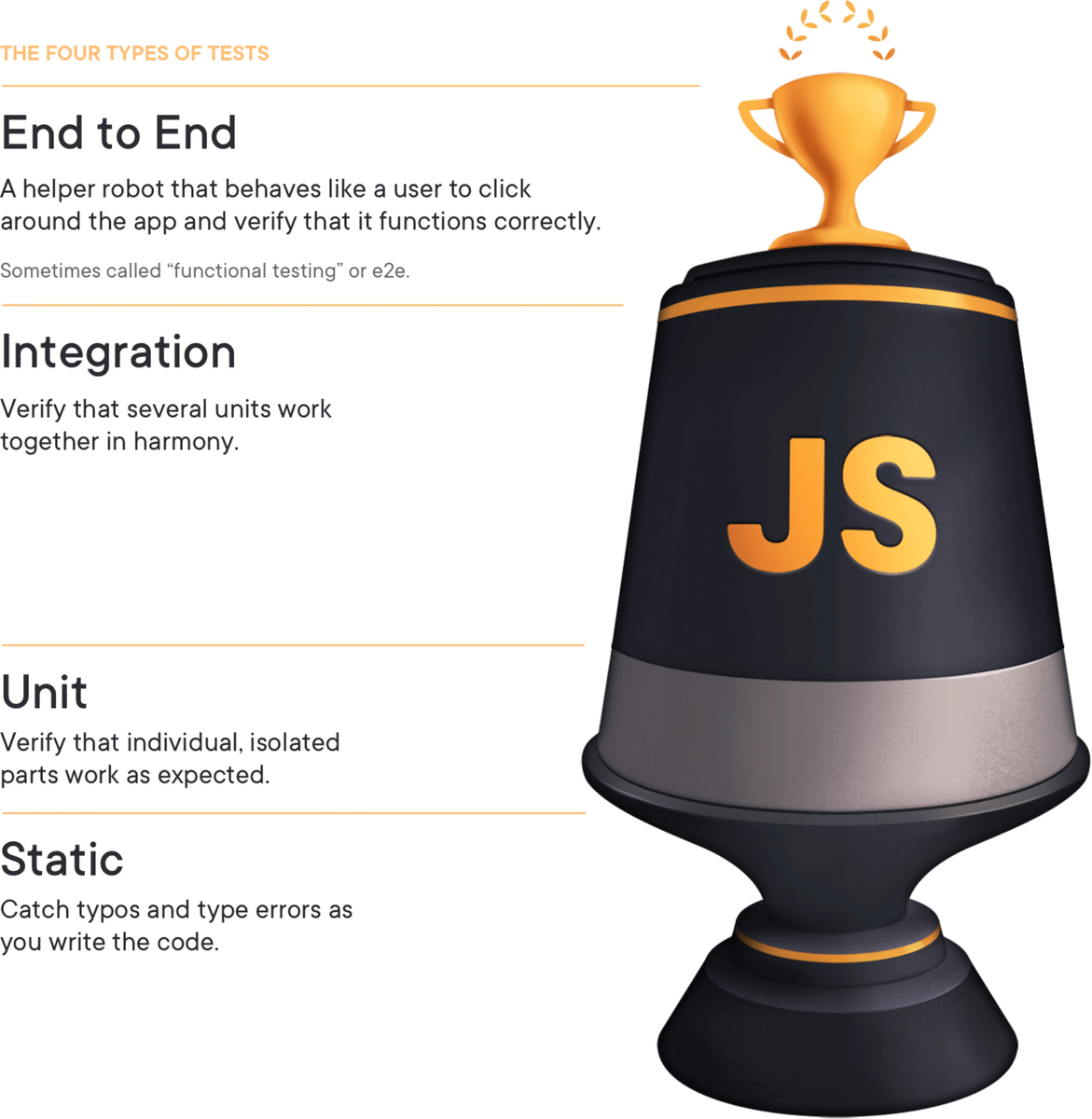
ポイントは「ピラミッド」ではなく「トロフィー」
この考えでは「最も費用対効果が高いのは統合テスト」だと指摘しています。 実際、アプリケーションでのユースケースを1つのコンポーネント単位でシナリオベースに検証できる統合テストは、「動く保証」も得られつつ、保守性や実行速度も良好で、非常に実用的です。
実際は…
理想を言えば、フロントエンドのテストもしっかり書いておきたいところ。しかし、バックエンドと違って「見た目で確認できるし、とりあえず動いてるからOK!」とつい手動確認で済ませてしまう現場も少なくないと思います。また仕様が複雑になるにつれて確認すべきパターンが増え、テストに必要なデータの再現も手間がかかるようになります。その結果、手動確認のコストがどんどん膨らみ、ミスや確認漏れのリスクも高まっていくという課題に直面することになります。弊社でもStorybookでプリミティブなUIコンポーネントのテストはありましたが、実際のデータと疎通するような統合的なコンポーネントのテストは多くはありませんでした。また Storybookでパターンを作ってもそれぞれのテストをメンテナンスするのは大変という別課題も発生しえます。
そこでStorybook Play function X AHA testing!!
Storybook Play functionとは
Storybookは、コンポーネントの「見た目」をドキュメントとして整理・確認できる便利なツールですが、見た目だけでなく「動き」まで含めて検証できる のがStorybookの Play functionです。
play関数は、Storybook上でコンポーネントを描画したあとに、ユーザー操作を自動で再現したり、状態変化をテストしたりできる仕組みです。フォーム入力やボタンのクリック、表示の切り替えといった実際のユーザー体験に近い振る舞いをStorybookで再現できます。
- ✅ コンポーネントのユースケースを動的に確認できる
- ✅ React Testing Libgrayがベースなので
userEventやexpectを使ってテストのように振る舞いを検証できる - ✅ CI上でも自動で回すことができる
AHA testing
AHAは Avoid Hasty Abstractions(性急な抽象化を避ける)の略で、Kent C. Dodds氏が提唱するテストコードの可読性と保守性を高めるための考え方です。
テストを書くときにありがちな「早すぎる共通化や関数化」を避け、まずはそのままの形で意図が伝わるテストを書くことを優先しようという考え方です。もちろん、全く抽象化するなという話ではなく、同じ操作が複数回出てきて本当に意味のある再利用性が見えたら、そこで抽象化すればOKというのがAHAの考え方です。
The AHA Programming Principle stands for "Avoid Hasty Abstraction." I have specific feelings about how this applies to writing maintainable tests. Most of the tests that I've seen in the wild have been wildly on one side of the spectrum of abstraction: ANA (Absolutely No Abstraction), or completely DRY (Don't Repeat Yourself). (I made up ANA just now). 冒頭より引用
I would consider this pre-mature abstraction if you've only got two or three tests in the file that is using it and those tests are short. But if you've got some nuance you're testing (like error states for example), then this kind of abstraction is great. Noteセクションより引用
StorybookでいくつものStoryを書く際、各StoryにPlay Functionでテストを書くなら、このAHA Testingの考え方は非常に役立ちます。
Storybook Play function X AHA testing
この2つをかけ合わせたのが、今回紹介する Storybook Play function X AHA testing です。
実際の実践コード例
const mutation = fn();

const meta = {
  title: "features/article36/Article36SettingPage",
  component: Article36SettingPage,
  parameters: {
    layout: "fullscreen",
  },
} satisfies Meta<typeof Article36SettingPage>;

type Story = StoryObj<typeof meta>;

// ユーザー操作に必要な要素と操作のユーティリティ関数群を定義
async function setupAction(canvas: ReturnType<typeof within>) {
  const startMonthInput = await canvas.findByLabelText("36協定の起算月");

  const navigationHeader = canvas.getByRole("navigation");

  const getConfirmModal = async () =>
    await screen.findByRole("dialog", {
      name: "36協定設定",
    });

  const getNotificationElement = async () =>
    await screen.findByRole("alert");

  const changeStartMonth = async (value: string) => {
    await userEvent.clear(startMonthInput);
    await userEvent.type(startMonthInput, value);
  };

  const clickSubmitButton = async () => {
    const submitButton = await canvas.findByRole("button", { name: "保存" });
    await userEvent.click(submitButton);
  };

  const clickConfirmButton = async () => {
    const confirmModal = await getConfirmModal();
    const confirmButton = await within(confirmModal).findByRole("button", {
      name: "更新",
    });
    await userEvent.click(confirmButton);
  };

  return {
    navigationHeader,
    startMonthInput,
    getConfirmModal,
    getNotificationElement,
    changeStartMonth,
    clickSubmitButton,
    clickConfirmButton,
  };
}

export const NoSetting: Story = {
  parameters: {
    msw: {
      handlers: [
        mockCommonGetGlobalSettingsQuery,
        mockGetTenantArticle36SettingPageQuery(() => {
          return HttpResponse.json({
            data: {
              attendanceArticle36Setting: anAttendanceArticle36Setting({
                startMonth: undefined,
                ~~ 省略 ~~
              }),
            },
          });
        }),
        mockUpsertArticle36SettingMutation(({ variables }) => {
          mutation(variables.param);

          return HttpResponse.json({
            data: {
              attendanceUpsertArticle36Setting: true,
            },
          });
        }),
      ],
    },
  },
  play: async ({ canvasElement }) => {
    const canvas = within(canvasElement);
    const {
      navigationHeader,
      startMonthInput,
      getConfirmModal,
      getNotificationElement,
      changeStartMonth,
      clickSubmitButton,
      clickConfirmButton,
    } = await setupAction(canvas);

    // 36協定設定ページのタイトルを確認
    const pageTitle = within(navigationHeader).getByText("36協定設定");
    expect(pageTitle).toBeInTheDocument();

    // 起算月を4月に変更
    await changeStartMonth("4");
    expect(startMonthInput).toHaveValue("4");

    // 保存ボタンをクリック
    await clickSubmitButton();

    // 確認モーダーが表示されることを確認
    const confirmModal = await getConfirmModal();
    expect(confirmModal).toBeInTheDocument();

    // 起算日のテキストが表示されることを確認
    const startDayText = await canvas.findByText("起算日は4月1日になります");
    expect(startDayText).toBeInTheDocument();

    // 確認モーダルの「更新」ボタンをクリック
    await clickConfirmButton();

    // 通知が表示されることを確認
    const notificationElement = await getNotificationElement();
    expect(notificationElement).toHaveTextContent("更新しました");

    // Mutationの呼び出しの確認
    await waitFor(() => {
      expect(mutation).toHaveBeenCalledWith({
        startMonth: 4,
        ~~ 省略 ~~
      });
    });
  },
};

// 別のパターンのStory
export const Pattern1: Story = {
  ~~~
};

export const Pattern2: Story = {
  ~~~
};

export const Pattern3: Story = {
  ~~~
};

export default meta;
※ ところどころ省略・書き換えしています。
ポイントまとめ
ユーザー目線の自然なテスト
基本的には上から下に読んでいくだけで、「ユーザーが実際にどういう操作をするのか」に合わせてテストが構成されているため、シナリオベースなテストが書きやすくなります。また、テストコード自体がユーザーの操作手順をそのまま記述したような構造になっているため、初見の開発者でも流れを追いやすく、レビューや保守もしやすいという利点があります。
「どこで何をして、どういう結果を期待しているのか」が明確になることで、UIの仕様変更にも強く、テスト意図がブレにくいのも大きなメリットです。
// 36協定設定ページのタイトルを確認
const pageTitle = within(navigationHeader).getByText("36協定設定");
expect(pageTitle).toBeInTheDocument();

// 起算月を4月に変更
await changeStartMonth("4");
expect(startMonthInput).toHaveValue("4");

// 保存ボタンをクリック
await clickSubmitButton();

// 確認モーダーが表示されることを確認
const confirmModal = await getConfirmModal();
expect(confirmModal).toBeInTheDocument();

// 起算日のテキストが表示されることを確認
const startDayText = await canvas.findByText("起算日は4月1日になります");
expect(startDayText).toBeInTheDocument();

// 確認モーダルの「更新」ボタンをクリック
await clickConfirmButton();

// 通知が表示されることを確認
const notificationElement = await getNotificationElement();
expect(notificationElement).toHaveTextContent("更新しました");
ユーザー操作の抽象化と共通化
1つのコンポーネントがいくつかのパターンを持つ場合に、それぞれでユーザーアクションのテストコードをを書いていくのはメンテナンス面でも可読性の観点でも大変です。AHA Testingを参考にユーザーのアクションに必要な要素とアクションを関数として抽象化しており、抽象化しすぎないようにしています。操作の部品を setupAction関数で整理することで、重複のない・読みやすいコード構成になります。他のストーリーでも使い回せて、パターンの増加にも強くなります。
async function setupAction(canvas: ReturnType<typeof within>) {
  const startMonthInput = await canvas.findByLabelText("36協定の起算月");

  const navigationHeader = canvas.getByRole("navigation");

  const getConfirmModal = async () =>
    await screen.findByRole("dialog", {
      name: "36協定設定",
    });

  const getNotificationElement = async () =>
    await screen.findByRole("alert", {
      name: "更新しました",
    });

  const changeStartMonth = async (value: string) => {
    await userEvent.clear(startMonthInput);
    await userEvent.type(startMonthInput, value);
  };

  const clickSubmitButton = async () => {
    const submitButton = await canvas.findByRole("button", { name: "保存" });
    await userEvent.click(submitButton);
  };

  const clickConfirmButton = async () => {
    const confirmModal = await getConfirmModal();
    const confirmButton = await within(confirmModal).findByRole("button", {
      name: "更新",
    });
    await userEvent.click(confirmButton);
  };

  return {
    navigationHeader,
    startMonthInput,
    getConfirmModal,
    getNotificationElement,
    changeStartMonth,
    clickSubmitButton,
    clickConfirmButton,
  };
}
Code Generatorを活用してテストを書くのを楽にする
弊社では、フロントエンドとバックエンドの通信に GraphQL を採用しており、スキーマから型情報やモックデータを自動生成するために GraphQL Code Generator を活用しています。特に、StorybookのPlay Functionを使ったUIテストでは「どんな状態のデータで、どのようなUIが再現されるか?」が非常に重要になります。そのため、クエリやミューテーションに対するモックデータやモックレスポンスを手軽に用意できる仕組み があると楽ができます。
graphql-codegen-typescript-mock-data
GraphQLスキーマから自動でTypeScriptのモックデータを生成できるため、開発やテストでいちいち手作業でモックデータを作る面倒から解放されます。型に基づいたダミーデータが出力されるので、開発の初期段階でもリアルなデータ形状を扱った動作確認が可能になります。
@graphql-codegen/typescript-msw
GraphQLのクエリやミューテーションに対応したモックレスポンス関数を型安全に自動生成できます。MSW(Mock Service Worker)と連携して、フロントエンド側でネットワークレスポンスをシミュレートできるため、フロントエンドで完結してUI開発が進められます。型情報を元にしているため、モックの誤実装も防ぐ事ができます。
まとめ
StorybookのPlay FunctionとAHA Testingを組み合わせることで、UIテストをもっと実用的に、もっと自然な形で組み込むことができます。 「なんとなく手動確認で済ませていたUIの振る舞い」をコードで保証できるようになると、開発の安心感もチームの生産性も大きく向上します。まずは1つのコンポーネントから、ぜひ試してみてください!
バクラクで働くことに興味のある方は、ぜひ以下からご応募ください!
